Ledger Lens
An AI-powered accounting gateway that transforms the chaotic influx of invoices, receipts, and financial emails into structured, audit-ready data. Your books stay current to the minute.
The shoebox is killing your books.
Invoices arrive as PDFs. Receipts come as blurry photos. Some vendors just put the details in the body of an email. End of the month, someone — usually the person least qualified to do it — sits down with a box of paper and a stack of emails and types it all into a spreadsheet. It takes hours. It's error-prone. And by the time it's done, the data is already weeks old.
Your accountant gets a ledger that's 30 days behind reality. Your cashflow decisions are based on last month's guess.
Every expense, captured the moment it happens.
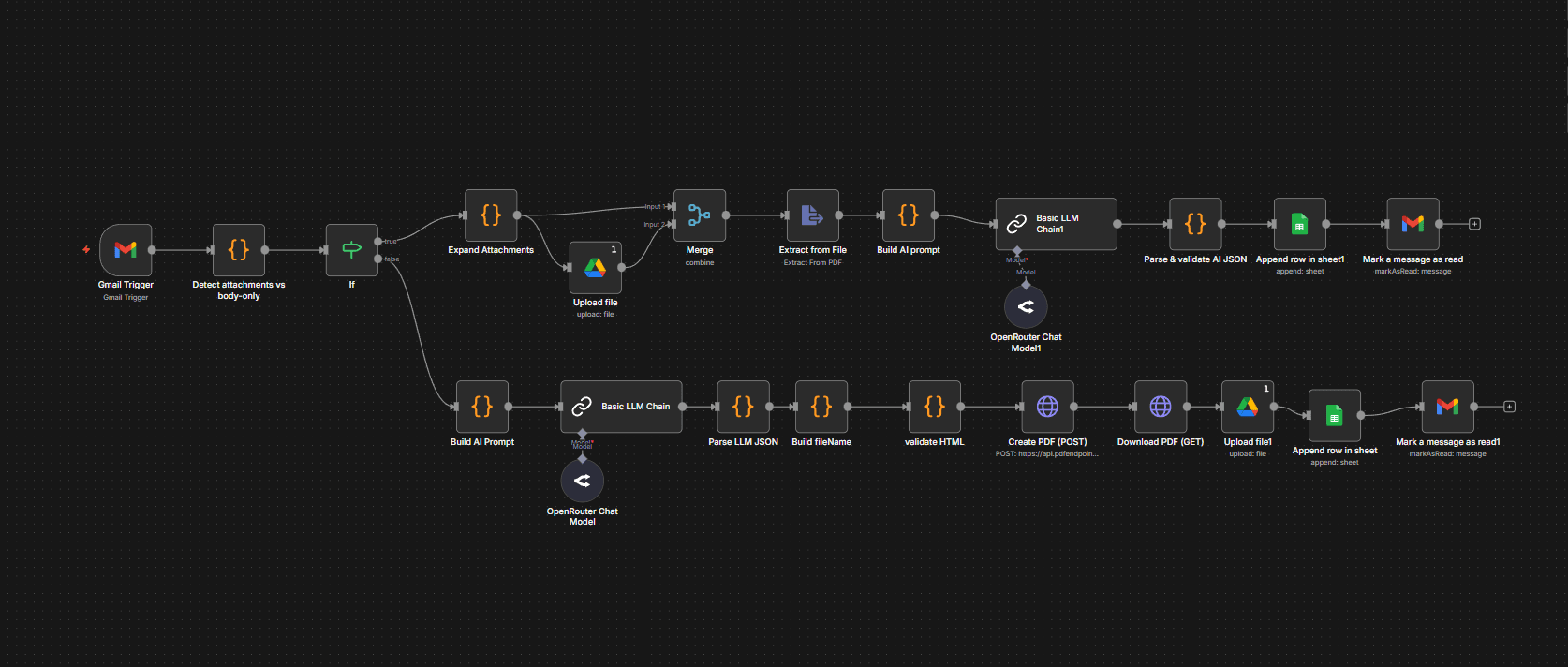
Ledger Lens monitors your invoices@ or receipts@ inbox 24/7. When a new email arrives, it identifies whether the financial data is in an attachment (PDF, image) or in the email body itself. It extracts the date, vendor, amount, currency, and expense category — then archives a standardised PDF in Google Drive and appends a new row to your live Google Sheets ledger with a direct link to the file.
No typing. No month-end scramble. Your books are always current.
PDF. Photo. Email body. Doesn't matter.
A professional PDF invoice from a supplier. A crumpled thermal receipt photographed in bad lighting. An Amazon order confirmation with no attachment at all — just the details in the email body. The system handles all three with the same pipeline. If the invoice is an HTML email with no attachment, it even auto-generates a clean PDF for your records.
Every document named. Every document findable.
No more files called IMG_592.jpg. Every document is automatically renamed using a consistent format — date, vendor, amount (e.g., 2024-05-12-adobe-subscription-14-99.pdf). They're stored in a structured Google Drive folder. When your accountant asks for "that receipt from March," you search for the vendor name and find it in seconds.
Your spreadsheet is your financial dashboard.
Every extracted transaction is appended to your Google Sheets master ledger with date, vendor, amount, currency, category, and a clickable link directly to the archived document. The spreadsheet becomes a live financial dashboard — always current, fully linked, and ready for tax season without a single hour of manual reconciliation.
Month-end becomes any-day.
When expenses are captured in real time, month-end isn't a crunch. It's a review. The data is already there. The documents are already filed. Your accountant spends their time analysing, not typing.
Drowning in receipts?
Let's automate your expense pipeline. Free 30-minute audit — no commitment.
Book a Free Audit →